Ask your library: rag and ask
paperful rag ingest builds a search index from the PDFs and abstracts in the
on-disk mirror. paperful ask answers a question from that index and names the
papers and pages it used. paperful rag search shows the matching passages
without a chat model. On the workbench, that is Index → Ask (Advanced).
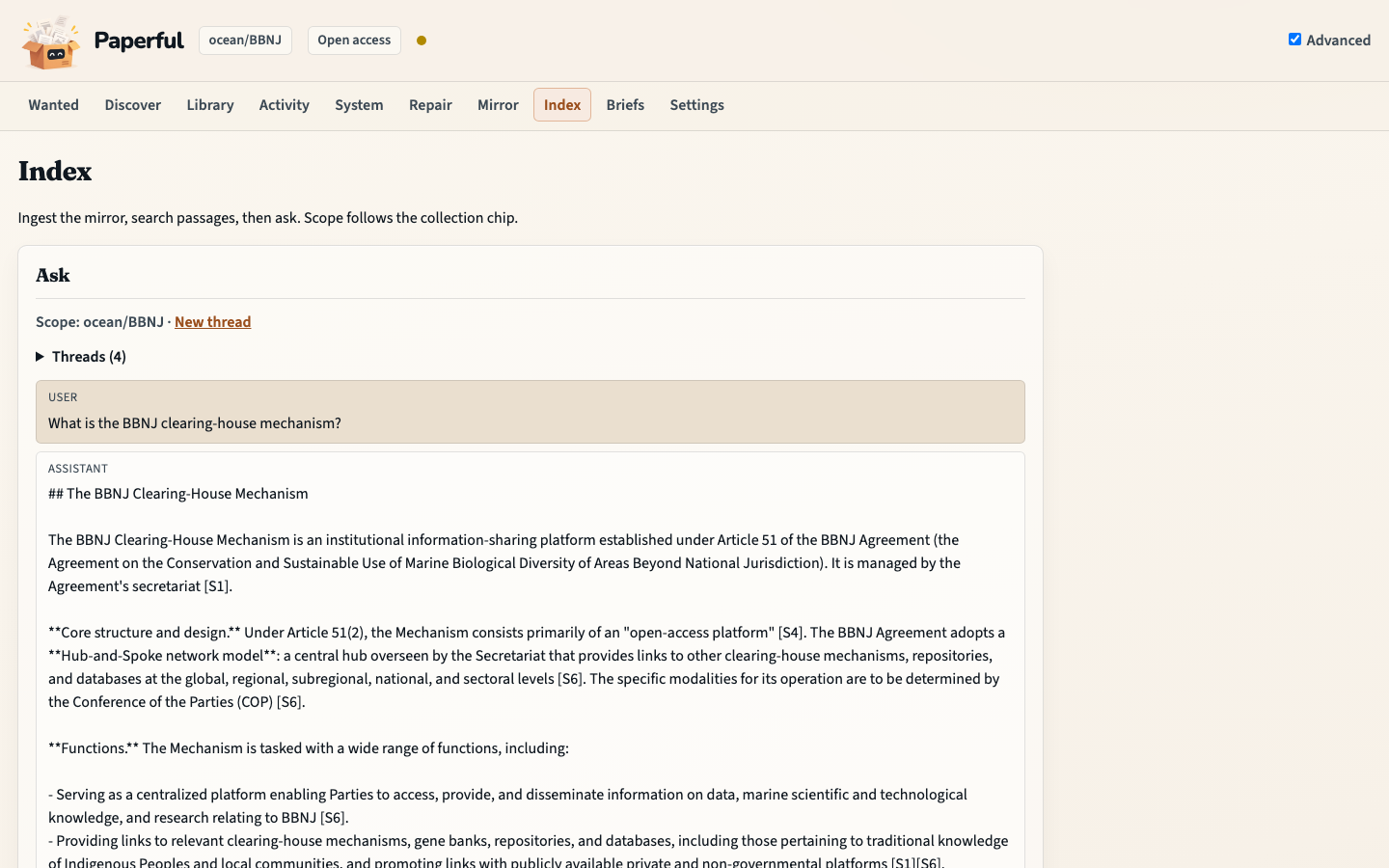
Everything here is optional and off until [rag].enabled = true.
What it reads and writes
Reads
out_dironly:record.jsonand the PDFs beside it. It never calls Zotero, Mendeley or EndNote, and works with the reference manager closed.Writes under
state_dir/rag/: extracted text, the index, and a ledger of what was indexed. The index is a cache; delete the folder and runrag ingestto rebuild it.Changes one thing in the mirror: a scanned PDF. With
[rag].ocr = "auto"(the default) ingest runs OCRmyPDF on PDFs that have no text layer and replaces the file underout_dirwith the text-layer version, the same rewritepaperful ocr --applydoes, but without an--applyflag. It also records the file instate/manifest.jsonl, asocrdoes. Setocr = "off"or pass--no-ocrto leave scans alone.
Born-digital PDFs are never sent to OCR. A PDF counts as a scan when fewer than 60% of its pages have a text layer, so a figure-only cover does not trigger OCR and a typed cover in front of a scan does not hide it.
Coverage depends on the mirror
Only PDFs that are in out_dir can be indexed. With the default
[mirror].pdfs = "additional", PDFs that live only in the reference manager
are not in the mirror, so those items are indexed from their abstract (or not at
all when they have none). paperful rag status counts them. To bring them in:
uv run paperful snapshot --library --pdfs all
uv run paperful rag ingest --library
snapshot is the step that talks to the reference manager; ingest does not.
Install
uv sync --extra rag                 # LanceDB
ollama pull nomic-embed-text        # default embedding model
# or build the heavy Compose image (includes [rag]):
# PAPERFUL_IMAGE_MODE=heavy docker compose build
ask also needs a chat model: follow llm.md and set
[llm].enabled = true.
LanceDB ships wheels for Apple Silicon, Linux (x86_64, aarch64) and Windows.
There is no wheel for Intel macOS; on an Apple Silicon Mac make sure the
environment uses an arm64 Python (uv venv --python /opt/homebrew/bin/python3)
and not an x86_64 build under Rosetta. The heavy Compose image
(PAPERFUL_IMAGE_MODE=heavy) includes [rag]; light (CI default) does
not. See Docker.
Configure
[rag]
enabled = true
auto_ingest = false            # true: index new PDFs after run / attach / inbox / snapshot / ocr
ocr = "auto"                   # auto | off
parser = "light"               # light | docling
embed_provider = "ollama"      # ollama | litellm
embed_model = "nomic-embed-text"
top_k = 10                     # passages sent to the model per question
# model = "qwen2.5:14b"        # chat model for ask; default is [llm].model
All keys and defaults are in config.example.toml.
Embedding model
The default, nomic-embed-text, is small, fast and mainly English. For a
library with papers in several languages use bge-m3:
ollama pull bge-m3
[rag]
embed_model = "bge-m3"
Each embedding model has its own index folder
(state/rag/ollama__nomic-embed-text/, state/rag/ollama__bge-m3/). Changing
embed_model therefore starts a new index and leaves the old one untouched;
run rag ingest again to fill it. Text extraction is cached, so only the
embedding is repeated. Switch back and the earlier index is still there.
For a hosted model set embed_provider = "litellm" and a LiteLLM model name
such as openai/text-embedding-3-small (needs paperful[llm] and the
provider’s API key in the environment). Passage text then leaves the machine,
and the commands say so.
Parser
light uses pdftotext (Poppler), with pypdf as fallback. It is fast and
keeps page numbers; section headings are detected by rule.
docling reads layout and gives cleaner headings and tables, at a large cost in
install size (it pulls in PyTorch) and time:
uv sync --extra rag --extra rag-docling
[rag]
parser = "docling"
Changing the parser re-indexes every PDF on the next ingest.
Build the index
uv run paperful rag ingest -C BBNJ --dry-run     # what would be indexed; writes nothing
uv run paperful rag ingest -C BBNJ               # one collection
uv run paperful rag ingest --library             # everything in the mirror
uv run paperful rag ingest --library --limit 500 # a long first build, in parts
uv run paperful rag status                       # what is indexed, what is behind
-C is a folder path under out_dir, for example ocean/BBNJ.
Ingest is incremental. An item is worked on again only when its PDF changed, a
PDF arrived for an item that had only an abstract, its abstract changed, or the
chunking settings changed. Unchanged items cost one file stat. Stop it with
Ctrl-C at any time; the next run continues.
Flag |
Effect |
|---|---|
|
Scope. One is required. |
|
Filter the scope. |
|
Work on at most N items this run. |
|
Print the plan. No embedding, no OCR, no writes. |
|
Do not OCR scans this run. They are picked up by a later run. |
|
Try again PDFs that failed earlier (unreadable file, OCR error). |
|
Re-index items in scope even when nothing changed. |
--library with no filter and no --limit also removes items from the index
that are no longer in the mirror.
An item with several distinct PDFs is indexed from the newest one.
rag status counts these.
A first build of a large library takes a while: locally, expect roughly 75
passages a second with nomic-embed-text, and around 60 passages for a typical
paper. OCR adds seconds to minutes per scan.
Keep it current automatically
[rag]
auto_ingest = true
With this on, run, attach, inbox, snapshot, ocr --apply, snowball
with --fetch-pdfs, and the handoff walks index the PDFs they just landed,
after their own work is done. A failure there never fails the command: it
prints one line and rag ingest catches up later. It is off by default.
Search and ask
uv run paperful rag search "environmental impact assessment thresholds" -C ocean/BBNJ
uv run paperful ask "What does the BBNJ Agreement require for EIAs?" -C ocean/BBNJ
uv run paperful ask "…" --show-context     # also list the passages used
uv run paperful ask "…" --format json      # one paperful.agent.json.v1 object (implies --no-stream)
uv run paperful ask "…" --focus gaps       # prompt preset (default|questions|gaps|methods|answered)
uv run paperful ask --from-file questions.txt -C ocean/BBNJ   # batch → state/ask-batch/
uv run paperful ask                        # prompt for several; follow-ups share a thread
uv run paperful ask --thread new "…"       # start a stored thread
uv run paperful ask --thread <id> "and the EIA part?"
--format json needs a question on the command line (or --from-file; no TTY
multi-question loop). Agents that can shell out should prefer that over
paperful mcp (ask and other read-only tools return the same envelope; see
commands — Agent channel). Exit codes follow the
commands table.
ask prints the answer as it is written, then the sources it cited:
… stomach content analysis of fish caught by midwater trawl [S1].

Sources
[S1] Gjøsæter (1973). The food of the myctophid fish … pp. 1-2, p. 7. [2WZ8G7GW]
The marker in the text, the paper, the pages the passages came from, and the
item key. When the model cites nothing, the retrieved papers are listed as
“Retrieved, not cited” so you can see what it was given. --item, -C,
--year-from, --year-to and --type narrow what is searched. Each run
writes state/runs/<stamp>-ask.json with the questions, answers and sources.
Without a question on a TTY, ask prompts for one at a time and keeps a
thread under state/rag/threads/. Follow-ups are rewritten into a standalone
search query before retrieval; the model still sees the conversation. Piped
lines and a one-shot paperful ask "question" stay independent unless you
pass --thread.
Batch, focus, and research questions
--from-file (or -) runs one question per line with no thread rewrite.
Results land in state/ask-batch/<stamp>/ (pack.json =
paperful.ask_batch.v1, plus answers.md). Unchanged question + focus +
index tip rows are skipped unless --force. Optional
--apply -C … --to zotero|both writes a collection note (never a silent
parent edit).
--focus selects a bundled system prompt (default, questions, gaps,
methods, answered). [rag].focus sets the default; --prompt FILE wins
over focus. Named run profiles may set focus alongside scope keys.
uv run paperful rag questions -C ocean/BBNJ          # rules → state/rag/questions/
uv run paperful rag questions --library --llm        # also grounded LLM extract
uv run paperful rag answered --from-extract -C ocean/BBNJ
uv run paperful rag answered --from-file qs.txt --after-item AAAA1111
rag questions writes per-item JSON with provenance rule or llm.
rag answered reuses the batch engine with --focus answered and writes
state/rq-answered/<stamp>/ (paperful.rq_answered.v1). --after-item
keeps only newer years and drops the asking paper from retrieval.
Workbench (Advanced Index)
With [rag] and [llm] on, Advanced Index runs the same verbs as the CLI:
ingest, search, threaded Ask, batch Ask, extract questions, already-answered
checks, and synthesize. Scope follows the collection chip (plus optional item
keys, years, types, top-k). Custom system prompts on Ask/batch, in order:
Inline textarea
Uploaded
.md/.txt(stored understate/gui/uploads/)Path field (resolved like
[rag].prompt, relative to the config file)Saved file from
state/prompts/(optional “Save as…” on the form)Else
[rag].prompt/ focus preset
Batch packs list under state/ask-batch/; answered packs under
state/rq-answered/ (pack.md). Routes: gui.md. CLI still owns TTY
multi-turn, --show-context, named run profiles, and paperful all.
Answers are only as good as the passages found. The model is told to answer from the excerpts alone and to say when they do not contain the answer, but a local 7B model can still misread or over-claim; check the cited pages.
Check
uv run paperful doctor        # RAG embeddings / RAG index rows
uv run paperful rag status    # index against the mirror
doctor is amber when the rag extra is missing, the embedding model is not
pulled, or no index has been built. rag status shows how many items a new
ingest would touch, how many scans wait for OCR, and how many PDFs failed.
Troubleshooting
Message |
Fix |
|---|---|
|
Set |
|
|
|
|
|
|
|
The folder was built with other settings. Delete that folder and ingest again. |
|
Start Ollama and run the same command; items already indexed are kept. |
A scan is indexed from its abstract only |
Install |